
Download Windows Defender Offline (64-bit) – Malware Removal, Rootkit Detection, Offline Security Tool
Overview
Windows Defender Offline (64-bit) is a specialized security utility developed by Microsoft Corporation to detect and eliminate deeply embedded malware, including rootkits, from compromised systems. Designed to operate outside the standard Windows environment, this tool provides a secure, isolated platform for scanning and remediation—ensuring that malicious software cannot interfere with the detection process. It is particularly useful in scenarios where traditional antivirus solutions fail to identify threats due to malware’s ability to hide within the operating system.
The application targets users experiencing persistent system instability, unexplained performance degradation, or suspected infections that resist standard removal methods. It is ideal for IT professionals, system administrators, and advanced home users who require a reliable method to restore system integrity. By launching from a bootable environment, Windows Defender Offline enables a comprehensive analysis of the system before Windows loads, significantly increasing the chances of uncovering hidden threats.
As part of Microsoft’s broader security ecosystem, this tool fills a critical gap in endpoint protection by offering a one-time, offline remediation option. Its standalone nature ensures that no existing malware can tamper with the scanning process, making it a trusted solution for system recovery. While the developer did not provide additional technical details on deployment or integration, its role in maintaining digital hygiene remains significant for users seeking a robust, no-cost security tool.
Key Features & Functionality
- Standalone Application: Windows Defender Offline operates independently of the host operating system, allowing it to run from a bootable USB or DVD. This independence ensures that malware cannot interfere with the scanning process, enabling a clean and accurate assessment of system health.
- Rootkit Detection: The tool is specifically engineered to identify rootkits—malicious software that embeds itself at the kernel level and often evades detection by standard antivirus programs. By scanning before Windows starts, it can reveal threats that remain invisible during normal operation.
- Safe Environment Scanning: Running in a trusted, pre-boot environment, the tool minimizes the risk of malware actively defending itself. This secure mode enhances detection accuracy and prevents malicious processes from blocking or corrupting the scan.
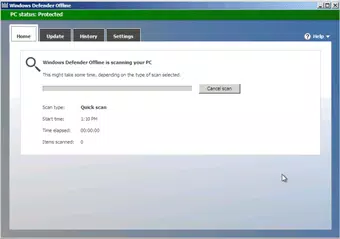
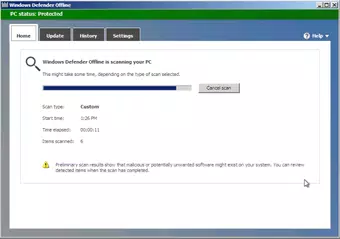
- User-Friendly Interface: Despite its technical purpose, the tool features a straightforward layout with clear on-screen instructions. Even users with limited technical experience can navigate the interface to initiate a scan and review results.
- Regular Updates: To maintain effectiveness against emerging threats, the tool receives periodic updates. These updates ensure the malware definitions remain current, allowing users to combat the latest variants of malicious software.
Real-world use cases include restoring a system infected with persistent malware after a failed antivirus scan, recovering a device compromised during a drive-by download, or preparing a clean system for reinstallation. Its ability to function without relying on the host OS makes it an essential utility for system recovery and digital security hygiene.
Interface, UX & Performance
The user interface of Windows Defender Offline (64-bit) is designed with clarity and accessibility in mind. The layout is minimalistic, focusing on essential actions such as initiating a scan, reviewing results, and rebooting the system. Navigation is linear and intuitive, guiding users through each step with visual cues and textual prompts.
Although the developer did not list formal performance metrics, the tool is optimized for efficiency during the boot and scanning phases. It operates within a lightweight, pre-boot environment, ensuring that system resources are not overburdened during execution. The interface remains responsive throughout the scan, with real-time progress indicators and status updates.
Performance may vary depending on the device’s hardware configuration, particularly in terms of boot speed and disk read times. However, the tool is designed to function across a wide range of 64-bit Windows systems, including older and modern hardware. Stability is maintained through its isolated execution environment, reducing the risk of crashes or unexpected behavior during critical operations.
For users unfamiliar with bootable tools, the interface provides sufficient guidance to complete the process without technical expertise. The absence of complex settings or configuration options ensures that the tool remains focused on its core purpose: secure, reliable malware removal.
Platform Compatibility & Technical Requirements
Windows Defender Offline (64-bit) is compatible with 64-bit versions of Windows operating systems. It is distributed as a bootable image, intended for use on USB drives or DVDs, allowing it to run independently of the installed OS. The application requires a device capable of booting from external media, such as a USB port or optical drive.
The file size is 1.5 GB, which is typical for a full-featured offline security tool containing updated malware definitions and scanning engines. This size supports the inclusion of comprehensive detection logic and ensures the tool remains effective against a wide range of threats.
The developer did not specify minimum OS requirements or compatibility with specific Windows versions beyond the 64-bit architecture. Similarly, no information was provided about required RAM, processor speed, or storage space beyond the boot media. Users are advised to ensure their system supports external booting and has available USB or DVD drive access.
Pros and Cons
Pros
- Operates in a secure, pre-boot environment, minimizing interference from malware.
- Specialized for detecting rootkits and deeply embedded threats that standard tools miss.
- Free to download and use, with no licensing or subscription fees.
- Simple, intuitive interface suitable for non-technical users.
- Regularly updated to maintain protection against evolving malware.
Cons
- Requires manual creation of bootable media (USB or DVD).
- Not available as a native app; must be used in a pre-boot scenario.
- Only supports 64-bit Windows systems.
- Does not provide continuous protection; designed for one-time use.
- Compatibility with older hardware may vary without official requirements.
FAQ
Is Windows Defender Offline safe to use?
Yes, the tool is developed by Microsoft Corporation and operates in a trusted environment. It is designed to be secure and does not install additional software on the host system.
Can I use Windows Defender Offline on a 32-bit system?
No, this version is specifically designed for 64-bit Windows systems. It does not support 32-bit architectures.
Do I need an internet connection to run the tool?
The tool does not require an internet connection during scanning. However, it may need one to download the latest update before creating the bootable media.
How often is Windows Defender Offline updated?
Updates are released periodically by Microsoft to include the latest malware definitions. Users should ensure they download the most recent version before use.
Can I use this tool on multiple computers?
Yes, the tool can be used on multiple systems as long as they are 64-bit Windows devices and support booting from external media.
Final Thoughts
Windows Defender Offline (64-bit) stands out as a powerful, no-cost solution for users facing severe malware infections that resist conventional removal methods. Its ability to scan systems before Windows loads makes it uniquely effective against rootkits and other stealthy threats. While it is not a replacement for real-time antivirus software, it serves as a critical recovery tool in the digital security toolkit.
Its straightforward interface, combined with strong detection capabilities, makes it accessible to both technical and non-technical users. For those dealing with persistent system issues or preparing a clean system for reinstallation, this tool offers a reliable and secure path to recovery.
Download Windows Defender Offline (64-bit) now to protect your system from hidden threats and ensure a clean, secure computing experience.


